Apr 21, 2026 · 5 min read
Use AI without crossing the cheating line
AI becomes risky when people skip the review. The useful question is how much learning and responsibility stay with you.

What changes
Safe AI use keeps the assessed thinking in your hands.
Try first
Write the marking criteria in your own words before you prompt.
Listen to this article on your commute via spotify.
The Two Signals
Over the past few months, I've noticed something in how professionals talk about AI at work.
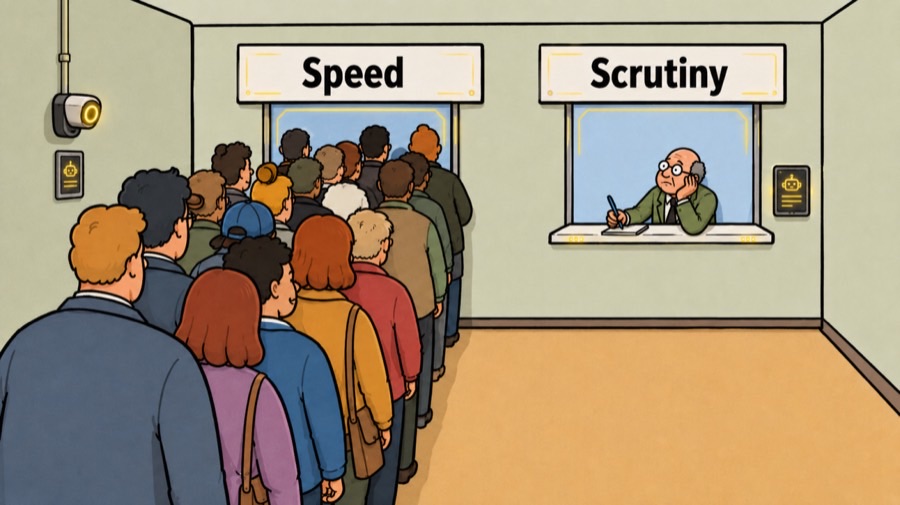
AI is deceptively polished. It is now so fast and fluent that it’s easy to read a paragraph, assume it’s correct, and move on. Verification is "theoretically" important. Everyone knows submitting unreviewed work is risky, but when speed is the primary currency and deadlines are tight, that risk feels abstract until it results in a public failure.
The First Pass — The Ghost Learner Effect
Unreviewed AI output carries hidden errors: hallucinations, misinterpretations, and inaccurate facts. When you skip verification, you trigger what researcher Andreas Rausch calls the "ghost learner effect."
When cognitively demanding tasks are offloaded to AI, the output may look professional, but the user fails to engage deeply with the material. You become a "ghost" in your own process—passing the "exam" (the deadline) without achieving the learning or understanding required to defend the work. Most discussions treat this as a personal integrity issue. It isn’t. It is a conflict between time and organizational structure.
Expertise Isn't a Safety Net
Research on error detection shows that domain expertise changes how we interact with AI, but not always for the better.
Experts who encounter errors early often lose trust in the system entirely. However, if the AI is correct early on, experts may dynamically adjust their trust. Novices often suffer from over-reliance because they lack the framework to detect subtle errors (Nourani et al., 2020).
The real gap isn't just between experts and novices; it is between those who verify and those who don’t. An expert who skips verification loses their edge and maybe reputation. A novice who actively verifies builds a capability they wouldn't otherwise have. Expertise only provides a framework for where to look—it doesn't do the looking for you.
Three Rules That Work — When Conditions Exist
Use It At Work
Try one move on a real task.
Write the marking criteria in your own words before you prompt.
The honest part: these rules work better in some workplaces than others.
If speed is required, use AI only in areas where you're already an expert.
You can evaluate output faster in domains you know. Prior domain knowledge can affect user trust and confidence in detecting system errors. User trust can also be influenced by first impressions with intelligent systems, and the relationship between ordering bias and domain expertise when encountering errors matters significantly (Nourani et al., 2020). Novices don't have that framework, experts do. Don't borrow speed from a domain where you can't verify.
But this assumes you have time to verify. If your manager set an impossible deadline and AI is the only way you ship anything, this rule becomes theoretical.
AI is not a database. Your prompts have to carry the context.
Specific, contextual instructions produce better output. Research demonstrates novel prompts that force a language model to break a problem into components before producing a verdict, and introduces the concept of metaprompt programming — an approach that offloads the job of writing a task-specific prompt to the language model itself Reynolds & McDonell, 2021).
Prompt practice
Add the context before you ask for the answer.
Prompt to avoid
"Write a market analysis."
Stronger prompt
"Write a market analysis for Q3 2024. For each trend, explain the underlying cause using root cause analysis. Then generate three verification questions to challenge this trend and answer them independently."
Adapt the topic, dates, and checks before you use this on your own work.
That second prompt forces the AI to show its reasoning and challenge itself. You're not trusting the first draft; you're directing the AI's thinking. But this assumes you have the cognitive load available to write precise prompts. If you're drowning in requests, you'll revert to vague asks and hope for the best.
Use AI to brainstorm and plan. You do the verification.
Research shows that GenAI really boosts creativity when coming up with ideas by helping designers avoid getting stuck (Hou et al., 2025). That’s where it’s really useful for everyone. But once you pick a direction, it’s up to you to check the work. In the creation stage, AI actually makes more work for expert designers. This is because designers have spent years learning how to create art. AI uses different methods to make creative work, and it can be tough for designers to change what AI made (Hou et al., 2025). They don’t just hand in the first draft.
The issue: by the time you’re picking a direction, you’ve already been influenced by what AI made. You’re checking a version of something you didn’t fully come up with yourself. That’s different from drawing an idea and then developing it with AI.
What Actually Changes Behavior
The "authenticity problem" is often structural. If your team is evaluated solely on turnaround time, verification is a blocker. If your organization cut senior staff to "save costs" with AI, they have removed the very people capable of performing the necessary oversight.
Organizations that treat AI as a skill-building moment, rather than a productivity hack, see different results. They reward people for catching errors and create space for the "Second Pass."
The Second Pass — What Stays True
Authenticity isn't about the origin of the words; it’s about the ownership of the intent. If you can't defend the work, you shouldn't submit it.
But if your workplace makes checking your work impossible as you learn to use AI, the problem isn't your integrity—it's the workflow. You are being asked to choose between speed and quality. If the workflow won't change, you have to decide which trade-off you are willing to live with, and most people don't chose the AI.
Bring One Task To A Workflow Call
If you are caught between the pressure to move fast and the instinct to actually understand what you’re submitting, I can help.
Bring one assignment, report, application, or repeated work task to a free workflow call. We can map where AI can support planning or review without taking ownership away from you.
The goal is simple: keep your thinking visible, keep your review points clear, and leave with one safer way to use AI on real work.
Put it to work
Complete the three-column boundary.
- I do: thesis, final answer, personal reasoning.
- AI supports: examples, quiz questions, feedback.
- I check: facts, citations, and wording.
Sources used4
- Hou, J., Wang, L., Wang, G., Wang, H., & Yang, S. (2025). The double-edged roles of generative AI in the creative process: Experiments on design work. Information Systems Research. https://doi.org/10.1287/isre.2024.0937
- Nourani, M., King, J. T., & Ragan, E. D. (2020). The role of domain expertise in user trust and the impact of first impressions with intelligent systems. Proceedings of the AAAI Conference on Human Computation and Crowdsourcing, 8(1), 112–121. https://doi.org/10.1609/hcomp.v8i1.7469
- Rausch, A. (2025, September 19). How AI can empower tailored learning. Times Higher Education Campus. https://www.timeshighereducation.com/campus/how-ai-can-empower-tailored-learning
- Reynolds, L., & McDonell, K. (2021). Prompt programming for large language models: Beyond the few-shot paradigm. In Extended Abstracts of the 2021 CHI Conference on Human Factors in Computing Systems (Article 314, pp. 1–7). ACM. https://doi.org/10.1145/3411763.3451760