Apr 13, 2026 · 7 min read
Told to use AI, but not given time to learn?
AI access does not create skill on its own. People need one useful task, clear instructions, and review rules.

What changes
AI training works better when people practise on one real work sample.
Try first
Bring one real email, report, request, or checklist to the training.
What the gap between AI adoption and AI learning actually produces — and what you can do about it.
Listen to the long-form on your commute.
Bring One Task To A Workflow Call
If your organization gave you AI access without a clear way to use it, bring one repeated task to a free workflow call. We can map where AI fits, what context it needs, and what you need to check before the output moves forward.
AI isn't going anywhere. Use your expertise today to make AI adoption easier in the future.
You're Not Behind. You're Being Careful.
If you've opened an AI tool, produced something that felt off, and quietly closed it again — that's not a failure. That what happens when the tool is handed to you without specific guidance with how to use it well. You went back to doing things the way that works because you want to have control over work that represents you and haven't had enough time to figure out where AI fits into it.
That experience is more common than most organizations are willing to admit and unfortunately isn't supporting responsible AI adoption.
The Two Instructions That Don't Add Up
Over the past year, I have observed a recurring pattern across North American workplaces. Organizations announce AI adoption initiatives and like Oprah handing out gift bags, everyone gets AI licenses. And then, largely on their own, employees are expected to figure out how to use them well.
The data reflects a widening gap between access and ability.
In Canada, 36% of employees received AI training but never started using it in their work — too overwhelmed to implement new processes (KPMG Canada, 2025). Another 37% started and stopped for the same reason. In the United States, Gallup found that the top barrier to AI adoption at work is not resistance or disinterest — it is an unclear use case. Employees are not sure how the tool fits the specific work they do (Gallup, 2026). These are not people who lack motivation. They are professionals who have been given a tool but have not been shown how to make it relevant to their actual job.
Interestingly enough, a 2026 Harvard Business Review study found that 93% of global AI and data leaders identified human factors — not technical limitations — as the primary barrier preventing AI from moving from an experiment to an essential business tool.
The technology is capable. The human side of the equation has not caught up.
The First Pass — What the Human Barriers Actually Look Like
When I look at what those human factors are, four patterns emerge consistently across the research.
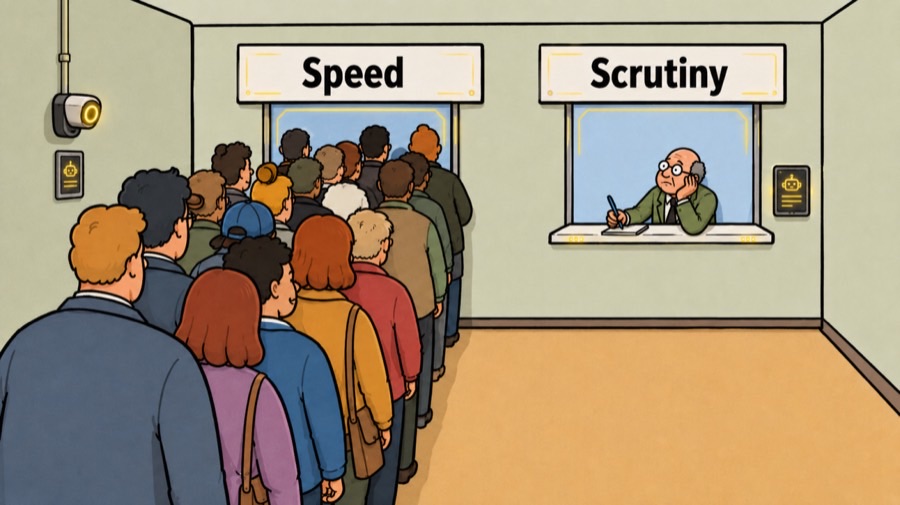
The first is what researchers describe as cognitive surrender. When output arrives looking polished and complete, overwhelmed workers stop scrutinizing it and accept automation bias (Goddard et al., 2012).
Automation bias: the tendency to over-rely on automated output when it looks correct
They accept the first pass as the final product, bypassing their own reasoning. A 2026 study by Workday discovered that 40% of the productivity improvements from AI are wasted because of rework and poor-quality results later on. That cost is almost always invisible until something goes wrong.
The second is a lack of psychological safety. When AI is introduced top-down, employees feel like bystanders to a decision already made. Without room to admit confusion or flag errors without appearing behind, most people quietly abandon the tools rather than risk looking like they cannot keep up.
The third is what I would describe as a maturity-expectation gap. There is a consistent disconnect between the broad transformation leadership expects AI to deliver and what professionals understand is actually required to do their specific, highly contextual work. Generic expectations meet specific realities and the result is frustration on both sides.
The fourth is change management fatigue. After years of digital transformations, many workers have learned to survive rollouts rather than engage with them. AI arrives looking like another initiative to outlast, not a tool worth mastering.
These four barriers share a common thread. None of them are technical. All of them point to the same underlying need: learning that is relevant to your work, not learning about AI in general.
What You Can Actually Do About It + a Free Gift
Use It At Work
Try one move on a real task.
Bring one real email, report, request, or checklist to the training.
Work with AI in a way that matches how you actually learn.
Most AI advice assumes everyone approaches a new tool the same way. If you learn through iteration, try pushing back against the output. Give it a prompt, read what comes back, then tell it specifically what it missed. Ask it to try again. Repeat two or three times. If you think better by planning first, spend five minutes writing out the problem before you open the tool. Then bring that framing with you. The output you get from a well-framed starting point is meaningfully different from the output you get from a blank question.
Ask someone you trust what they have figured out.
A five-minute conversation with a colleague who does similar work to you and has found one useful application of AI in their work will often do more than an hour of broad research. Ask what they actually use it for. Ask what they stopped using it for. A peer who has already translated AI into the context of your industry has done the hardest part of the work for you — ask them to show you, not just tell you.
Find someone who can guide you through your actual work.
There is a meaningful difference between understanding that AI can help with writing and knowing how to apply it to the specific report due on Friday. Generic tutorials are built for a general audience. Your work is not general. You do not need a three-hour webinar on theory. You need twenty minutes with someone looking at the file on your desk right now — who can show you where AI fits that specific task and where it does not.
The Second Pass — What Actually Works
The research is consistent on this point. The OECD (2026) notes:
Training is most effective when it addresses practical application rather than theory alone.
Learning sticks when it is grounded in immediate relevance — when the concept is applied to a real problem the learner is already facing, not a hypothetical one constructed for a general audience.
Generic AI training doesn’t meet most professionals’ needs. It provides theory but leaves translation work to them alone, which takes more time than expected. Short, focused sessions that are tailored to your work are more effective. These sessions help professionals understand where AI saves time and where it doesn’t, without weeks of self-discovery. This clarity changes how the tool is used.
Bring One Task To A Workflow Call
If this describes your workplace, start smaller than an AI rollout. Bring one task from your role to a free workflow call and we can map the first useful workflow around it.
AI isn't going anywhere. Use your expertise today to make AI adoption easier in the future.
Put it to work
Build the first practice loop.
- Input: the email, report, request, or checklist.
- Standard: the signs of a usable answer.
- Review: the check before anyone uses it.
Sources used10
- Eatough, E., Ferrazzi, K., & Smith, W. (2026, February). Why AI adoption stalls, according to industry data. Harvard Business Review. https://hbr.org/2026/02/why-ai-adoption-stalls-according-to-industry-data
- Gallup. (2026, January). Manager support drives employee AI adoption. https://www.gallup.com/workplace/694682/manager-support-drives-employee-adoption.aspx
- Goddard, K., Roudsari, A., & Wyatt, J. C. (2012). Automation bias: A systematic review of frequency, effect mediators, and mitigators. Journal of the American Medical Informatics Association, 19(1), 121–127. https://doi.org/10.1136/amiajnl-2011-000089
- KPMG in Canada. (2025). Generative AI adoption index 2025. https://kpmg.com/ca/en/media/2025/11/canadians-call-for-clear-ai-policies-as-adoption-grows.html
- KPMG in Canada. (2026, March). Beyond AI adoption: Turning Canada's AI momentum into measurable returns. https://kpmg.com/ca/en/insights/2026/03/beyond-ai-adoption.html
- OECD. (2026). OECD digital education outlook 2026: Exploring effective uses of generative AI in education. OECD Publishing. https://doi.org/10.1787/062a7394-en
- Resume Now. (2026). AI oversight gap report. As cited in Allwork.Space. https://allwork.space/2026/04/one-in-three-workers-skip-reviewing-ai-output-putting-accuracy-at-risk/
- Statistics Canada. (2025). Analysis on artificial intelligence use by businesses in Canada, second quarter of 2025. https://www150.statcan.gc.ca/n1/pub/71-607-x/2018013/cai-eng.htm
- Vaid, S., Cheng, L., & Whillans, A. (2026, February). Where senior leaders are struggling with AI adoption, according to research. Harvard Business Review. https://hbr.org/2026/02/where-senior-leaders-are-struggling-with-ai-adoption-according-to-research
- Workday / Hanover Research. (2026, January). AI productivity and rework report. As cited in HR Dive. https://www.hrdive.com/news/ai-output-reduced-rework-low-quality-workday/810075/